.webp)

Did Your Bryant Thermostat Go Blank Just As the Heat Peaked?
Is your air conditioning system completely silent, or is the indoor unit running while your control screen remains totally dark? Fixing a blank Bryant thermostat screen during a July heatwave is a stressful situation, especially as the indoor temperature starts climbing by the minute. When the heat index spikes, losing your cooling system feels like an immediate emergency. However, a dead thermostat screen does not automatically mean your entire air conditioning system has suffered a catastrophic failure.
Most of the time, a blank screen is simply a symptom of a severed electrical connection somewhere else in the system. Before you panic and assume you need to replace your entire setup, there are a few basic triage points you can check yourself. These checks require zero tools and keep you completely safe from live electrical components. By understanding how your Bryant HVAC systems communicate with your thermostat, you can quickly determine whether you need an emergency repair or if a simple reset will get the cold air flowing again.
The Decision Point: Triage vs. Emergency Call
When you discover a blank screen during a severe July heatwave, you face a quick decision: do you call for immediate service, or do you investigate? The short answer is that you should always perform a visual, non-invasive inspection first. In our years of servicing Maple Plain, MN, our team typically sees that many service calls for "dead" thermostats turn out to be tripped safety switches or flipped breakers. This guide will walk you through the manufacturer-approved triage steps to potentially restore power safely, saving you time and stress when local technicians are at their busiest.
Understanding the 24-Volt Power Connection in Your Bryant Thermostat
A common misconception among homeowners is that a blank thermostat screen simply means the batteries are dead. While this is true for older, basic digital models, we find it is rarely the case for modern equipment. Most modern Bryant thermostat models do not rely on AA batteries to function. Instead, they are hardwired directly into your HVAC system's 24-volt electrical circuit.
This 24-volt circuit is the communication lifeline between your indoor air handler or furnace, your outdoor compressor, and your wall thermostat. The power originates from a transformer inside your indoor unit. It travels up a specific wire (commonly known as the "C-wire" or common wire) to keep your thermostat's screen illuminated and its Wi-Fi connected. When the screen goes completely blank, it usually means that 24-volt continuous power supply has been interrupted.
Why Swapping Batteries Won't Work on Hardwired Models
If your Bryant thermostat has a blank screen, popping it off the wall to look for a battery compartment will likely leave you frustrated. Even if your specific model has a battery backup slot, those batteries are typically only there to save your schedule settings during a brief neighborhood power outage. They do not have enough output to run the high-definition screen or the internal relays that trigger your air conditioning.
Here is what a loss of power actually indicates:
• A broken circuit: A safety mechanism inside the HVAC system has deliberately cut the power.
• A blown fuse: A small automotive-style fuse on the indoor control board has popped to protect the equipment from a surge.
• A tripped breaker: The main electrical panel has shut off power to the entire indoor unit.
If you perform the initial DIY checks outlined below and they do not restore the 24-volt connection, it is time to schedule HVAC service. A professional will need to use a multimeter to trace the electrical fault safely.
• Flashing "Low Batt" Warning — Battery-Operated Thermostat: Needs new alkaline batteries immediately. — Hardwired 24V Thermostat: N/A (Relies on system power).
• Screen completely blank — Battery-Operated Thermostat: Batteries are entirely dead. — Hardwired 24V Thermostat: System power is cut or safety switch tripped.
• Fades out when AC kicks on — Battery-Operated Thermostat: Weak batteries dropping voltage under load. — Hardwired 24V Thermostat: Failing transformer or loose wire connection.
• Settings lost after power outage — Battery-Operated Thermostat: No batteries installed. — Hardwired 24V Thermostat: Internal capacitor depleted; needs system power.
The Humidity Factor: Checking Your Drain Pan Float Switch
When diagnosing a blank screen during peak summer weather, you have to consider the environment. With summer temperatures regularly driving up the humidity in Maple Plain MN, your air conditioning system is doing much more than just cooling the air. It is also acting as a massive dehumidifier. The technicians at Countryside Heating and Cooling Solutions note that this regional climate factor is actually the number one reason Bryant thermostat screens go blank in the middle of summer.
How Condensation Impacts Your Thermostat
As warm, humid air blows over your indoor evaporator coil, the moisture in the air condenses into liquid water. During a severe July heatwave, a standard central AC system can pull up to 20 gallons of water out of your home's air every single day. All of this water drips down into a condensate drain pan located beneath the indoor coil, where it is supposed to flow safely outside through a PVC pipe.
However, algae, dust, and debris can easily clog that narrow drain line. When the line clogs, the water has nowhere to go, and the drain pan begins to fill up rapidly.
The Role of the Float Switch
To prevent this 20 gallons of water from overflowing and destroying your ceilings, floors, or drywall, your system is equipped with a condensate drain pan float switch. This small device sits on the edge of the drain pan or directly on the drain pipe. Inside the switch is a small floater.
The problem and the solution:
• The Problem: When the water level rises in the pan, the float rises with it. Once it hits a certain height, it triggers a switch that intentionally cuts the 24-volt power to your thermostat. The screen goes blank, the system shuts down, and the water stops flowing.
• The Cause: A clogged drain line exacerbated by extreme humidity and high dew points.
• The Solution: You must clear the clog and empty the standing water to reset the switch.
You can safely locate and inspect the drain pan near your indoor air handler. Look for a small PVC pipe near the bottom of the unit. If you see standing water pooling in the pan, or if the small float switch (often a T-shaped PVC fitting with wires coming out of it) is submerged, you have found your problem. If your AC not cooling properly is tied to a blank screen, this is always the first place we recommend looking.
Important warning: Never bypass the float switch to force the system back on. Bypassing this crucial safety device will restore power to the thermostat, but it will also cause the drain pan to overflow, resulting in severe and costly water damage to your home.
Quick Power Checks: Furnace Doors and Circuit Breakers
If your drain pan is completely dry and the float switch is resting in its normal position, the next step is to check for other common, non-technical power interruptions. Before we dispatch a technician, our team always asks customers to verify these points. Sometimes, a blank Bryant thermostat screen is the result of a simple bumped switch or a tripped breaker. These checks require zero tools, no exposure to dangerous wiring, and only take a few minutes to complete.
1. Check the Main Electrical Panel
Your HVAC system relies on dedicated circuits in your home's main electrical panel. If there was a brief power surge, or if the system was working exceptionally hard during the July heatwave, the breaker may have tripped to protect the equipment.
• Locate your main breaker box.
• Look for the breakers labeled "Furnace," "Air Handler," or "AC."
• Check if the switch is in the middle, neutral position (tripped) rather than fully ON.
• If it is tripped, push it firmly to the OFF position until it clicks, then push it back to the ON position.
2. Verify the Emergency Shut-Off Switch
Near your indoor unit (either in the basement, attic, or utility closet), there is usually a standard wall switch. It looks exactly like a regular light switch, but it controls the power to your furnace or air handler. Because it looks like a light switch, it is incredibly common for someone to accidentally bump it or flip it off when leaving the utility room—a pattern we see often during routine maintenance visits.
If this switch is flipped down to the OFF position, the entire indoor unit loses power, which immediately kills the 24-volt supply to your thermostat. Simply flip it back up to the ON position and check if your screen lights up.
3. Inspect the Furnace Door Safety Switch
Your indoor unit has a removable metal panel that covers the blower motor and the internal electrical components. Behind this panel is a small, spring-loaded safety switch. When the door is securely fastened, it presses the switch down, allowing power to flow. If the door is loose, off-center, or completely removed, the switch pops out and cuts all power to the system—including the thermostat.
This often happens if someone recently changed the air filter and didn't slide the metal panel perfectly back into its tracks. Push firmly on the corners of the furnace door. If you hear a click or feel the panel snap into place, the safety switch will re-engage. If this was the issue, your Bryant thermostat screen will reboot within a few seconds.
If you have run through these physical checks and the screen remains dark, you may need professional air conditioning services to test the internal voltage.
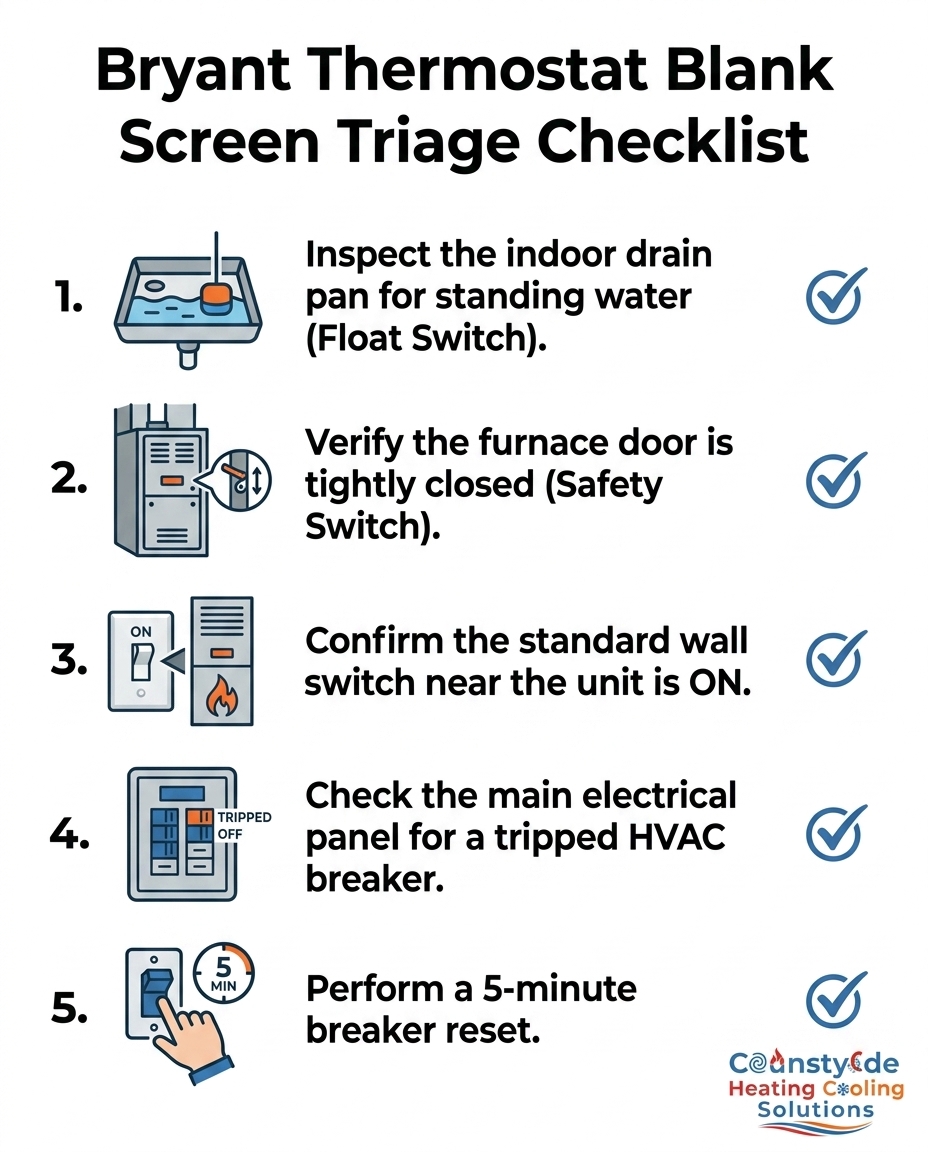
How to Reset Your Bryant Thermostat Safely
Sometimes, the system has power, but the thermostat's internal software has glitched due to a momentary power fluctuation. In these cases, a hard reset can restore communication between the wall unit and the main control board. As a Bryant Factory Authorized Dealer (and recipient of the Medal of Excellence), we always recommend following the manufacturer-approved safe reset steps. This process ensures you do not cause electrical surges that could damage sensitive circuit boards.
The Proper 4-Step Reboot Sequence
Do not simply pull the thermostat off the wall while the system is powered. Yanking the interface off its base plate while live voltage is running through the pins can cause an arc, potentially blowing the 3-amp fuse on the indoor control board. Instead, follow this numbered sequence:
1. Step 1: Turn off the HVAC system at the main circuit breaker. Go to your electrical panel and flip the breaker for the indoor unit (furnace/air handler) to the OFF position. This safely removes all voltage from the thermostat wires.
2. Step 2: Wait a full 3 to 5 minutes. This waiting period is critical. Your system has internal capacitors that hold an electrical charge even after the breaker is flipped. Waiting 5 minutes allows these capacitors to discharge completely and forces the control board to clear its temporary memory cache.
3. Step 3: Turn the breaker back on. Flip the switch firmly back to the ON position. Return to the thermostat and wait. It may take up to two minutes for the screen to boot up, display the Bryant logo, and reconnect to your home's Wi-Fi network.
4. Step 4: Observe the screen for error codes. If the blank screen resolves but the cooling does not start, watch the display carefully. The system may flash a specific error code or a colored light pattern indicating a deeper issue with the outdoor compressor.
If the screen remains completely blank after a full 5-minute breaker reset, the issue is beyond a simple software glitch. The communication wire is either damaged, the internal fuse is blown, or the transformer has failed.
Frequently Asked Questions: Bryant Thermostat Not Working
When your system goes down, you want fast answers. Before diving into the specifics below, remember that our comprehensive HVAC FAQ covers many other common cooling issues. Here are the most direct answers to the questions homeowners ask when their screen goes dark.
Why did my Bryant thermostat go blank?
A blank screen usually indicates a severed 24-volt electrical connection from the indoor HVAC unit, rather than a broken thermostat. Common culprits include tripped condensate float switches, blown 3-amp control board fuses, or an open furnace door that has triggered the safety shut-off switch.
When the indoor unit loses power or intentionally cuts power for safety reasons, the thermostat on the wall loses its power source immediately. Checking the drain pan for standing water is always the best first step.
How do I reset my Bryant thermostat?
You can safely reset the system by powering it down at the main circuit breaker for a few minutes. Turn the breaker off, wait a full 5 minutes for the system to discharge, and then restore power to initiate a clean reboot cycle.
Never try to reset the system by rapidly flipping the breaker back and forth, and avoid pulling the thermostat off the wall while the power is still on, as this can cause a short circuit.
Does a Bryant thermostat have batteries?
Most modern Bryant smart thermostats do not use batteries for their primary power source. They rely on continuous 24-volt power delivered through the C-wire connected to the furnace or air handler.
While some older, basic digital models might have a compartment for AA or AAA batteries, the advanced touchscreen models require hardwired power to operate their screens and internal relays.
What causes a thermostat to lose power?
Thermostats lose power suddenly when the circuit connecting them to the indoor unit is broken. Tripped circuit breakers, condensate drain pan overflow switches triggering, or blown fuses on the indoor unit's circuit board are the most frequent causes.
Power surges during summer storms can also blow the small automotive-style fuse on the control board, instantly cutting the 24-volt supply to the wall unit.
Restore Your Comfort with Expert Bryant Diagnostics
A fast, clear checklist of DIY troubleshooting steps can often restore power to your system without the need for a service visit. Checking your main breaker, ensuring the furnace door is tightly seated, and inspecting the drain pan for standing water are all safe, effective ways to resolve a blank Bryant thermostat screen. However, if you have performed a 5-minute system reset and the screen remains stubbornly dark, you have reached the limit of safe DIY repairs.
Persistent blank screens mean there is a deeper electrical issue, such as a burnt-out transformer, a severed C-wire, or a blown internal fuse on the main control board. We strongly advise against opening the blower compartment to attempt replacing internal fuses or bypassing safety switches without a professional license. Doing so risks serious electrical shock and further damage to the equipment. If your triage steps haven't worked, it is time to schedule an inspection with the local experts at Countryside Heating and Cooling Solutions. Our licensed technicians can accurately diagnose the system, test the voltage safely, and provide the fast, clear resolution you need to get your Maple Plain home cool again.
